
Description
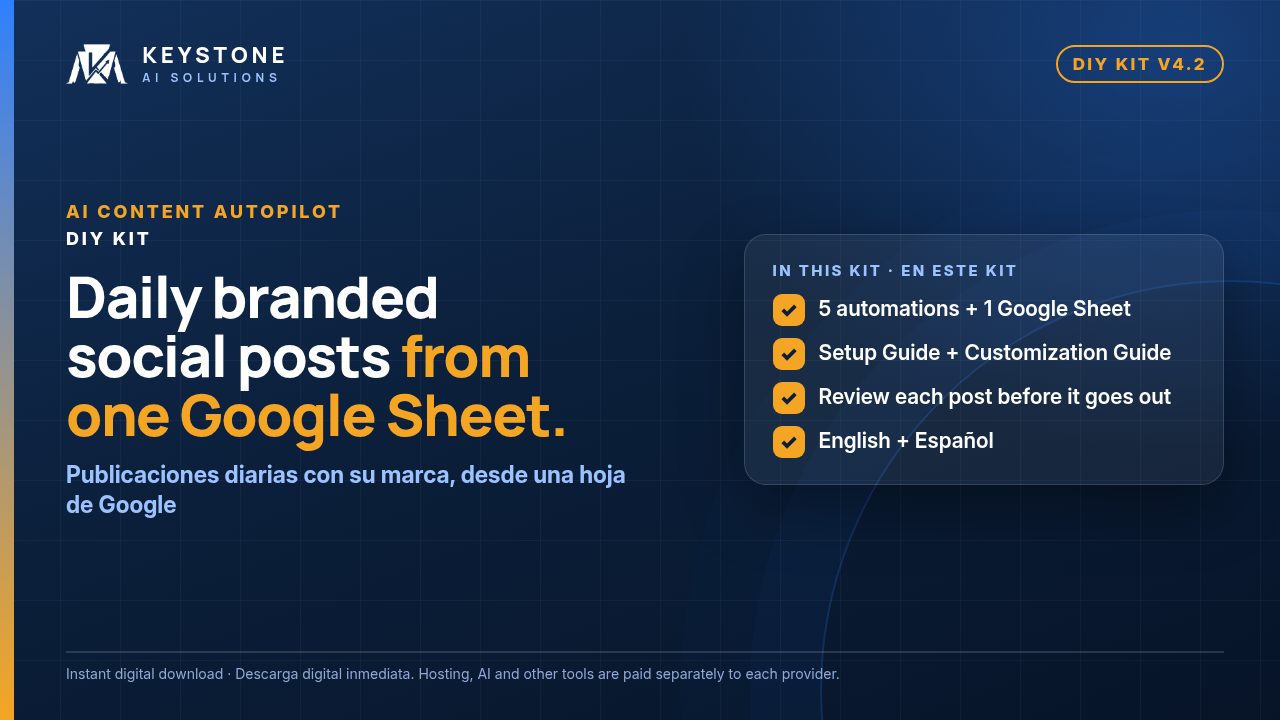
A daily social media content system that runs on your own automation hosting account, set up from one Google Sheet.
Texto en español más abajo.
AI Content Autopilot is a set of five ready-to-import automations plus a Google Sheet template. It finds recent news in your field, writes posts in the voice you describe, turns each one into a branded image card in your colours, fonts and logo, and publishes on a schedule you control. You check one tab of the Sheet each morning and can stop or change any post before it goes out.
What it does (v4.2)
- 1. Content Engine: researches the news sites and topics you list, reads the full text of the stories it picks (with Tavily), writes posts and creates the image cards. Runs twice a day by default; you choose the times.
- 2. Content Editor: picks the day’s posts and writes promo posts for the offers you add to the Offers tab, with promo images.
- 3. Auto Publisher: publishes single images and carousels to Facebook, Instagram and X through Upload-Post.
- 4. Image Renderer: turns each post and promo into on-brand cards: stat, steps and quote cards, X cards, carousels, and the v4 styles (split, chat, proof frame and Playbook carousels).
- 5. Error Alert: emails you if a run of workflows 1–4 fails.
- New in v4.2: all your settings are in one Settings tab in the Google Sheet. The only thing you set in a workflow is your Sheet link. Plus full-text research with Tavily, so posts are written from the article, not only a search snippet.
- Review before it posts: the Morning Review tab shows each day’s posts as cards with their images. Mark a post Rejected and it never posts, or turn on approval mode so only posts you approve go out.
- Built-in guardrails: the writer uses only the facts in each story and what you type in the Offers tab. A banned-claims list blocks things like income promises and “guaranteed” wording.
- Runs in your own accounts, with your keys and your data.
What’s included (two zips: English and Spanish)
- 5 automation files (JSON), ready to import
- Google Sheet template (Settings, Morning Review, Queue Gallery, Sources, Offers, Brand Settings and the other working tabs), filled in for a made-up sample business so you can test first
- 60-page Setup Guide (PDF) with real screenshots: accounts, importing the workflows, credentials (including Tavily), filling in the Settings tab, connecting Facebook, Instagram and X, error alerts, a safe test before going live, daily use and troubleshooting
- 86-page Customization Guide (PDF): how to change every content setting (niche, voice, content pillars, promo rhythm, schedule, images, carousels and the v4 visual styles), with ready-made recipes
- Includes a link to a free video walkthrough of the Google sign-in setup (connecting Google Sheets, Drive and Gmail)
- START-HERE.pdf and START-HERE.txt, sample cards (Examples folder), the guides as Markdown files, and a changelog
- Upgrading from v4.1? The Setup Guide has an Upgrading from v4.1 to v4.2 section. Note: the card themes are now called
dark,accentandlight.
Custom CRM integration available: want it connected to your CRM or other business tools? We can build it as a custom add-on, quoted after a short consult. The kit runs on your Google Sheet, so you don’t need a CRM to use it. Request a free consult: Book a free consult here
Who it’s for: small businesses, creators and agencies who want regular, on-brand posts from recent news in their field, are comfortable following a step-by-step guide, and want to review content in a spreadsheet. You can set it up for your own clients too.
What it doesn’t do
- It publishes to Facebook, Instagram and X (through Upload-Post). Pinterest is built in but switched off until you turn it on. TikTok is drafts only: it can write scripts for you to film, which aren’t posted automatically.
- It doesn’t reply to comments or messages, or run ads.
- It doesn’t promise reach, followers, leads or sales.
Before you buy
- What you need: an automation hosting account, which has its own monthly fee (cloud or self-hosted; the Setup Guide shows which to pick), a Google account (Sheets, Drive and Gmail), and accounts with Anthropic, OpenAI, Tavily, Upload-Post and htmlcsstoimage. The Setup Guide walks you through each one.
- Tool costs are billed separately. Your automation hosting account, Anthropic, OpenAI, Tavily, Upload-Post and htmlcsstoimage are each billed separately by their provider, and costs vary with your usage. They are not part of the kit price. Tavily, for example: with the default two Engine runs a day the kit uses about 1,000 Tavily credits a month, around the size of Tavily’s free monthly allowance at the time of writing; above that Tavily charges pay-as-you-go (about $0.008 per credit at the time of writing), billed by Tavily. Check each provider’s current pricing.
- Setup time, per step (from the Setup Guide checklist; estimates that depend on your accounts and how much you customise): create the accounts, about 30 min · get your automation hosting running, 10 min · Google Sheet and image folder, 20 min · import the five workflows, 15 min · connect your accounts, 30–45 min · fill in the Settings tab, news sites and offers, 20–30 min · connect Facebook, Instagram and X, 20 min · error alerts, 5 min · test, then switch it on, 20 min.
- Your accounts, your responsibility. The automations run on your own automation hosting account, Google, AI and social media accounts, under each provider’s terms and each platform’s rules. You’re responsible for what gets posted. This kit isn’t legal advice.
FAQ
- Do I need to code? No. You import the workflows, connect your accounts, paste your Sheet link once and fill in the Settings tab.
- Will it post things I haven’t seen? Only if you let it. Every post is in the Morning Review tab before its time, and approval mode means only posts you approve go out.
- Can I change the voice, topics and schedule? Yes, all in the Settings tab. The Customization Guide shows each setting with before-and-after examples.
- What if Tavily runs out of credits? The news search uses Tavily too. If your credits are already used up when a run starts (or your Tavily key is wrong), that run stops with “Tavily returned no fresh articles”, makes no posts, and workflow 5 emails you. Only if credits run out partway through a run, after the news search, does the full-text step fall back to the search snippets. A run also stops if every news result is older than 36 hours (the default freshness window) or isn’t an article. To avoid missed runs, keep an eye on your Tavily credit balance or turn on pay-as-you-go in Tavily.
- Can I install it for my clients? Yes. You may set it up for your own clients’ businesses, in their accounts or yours. You’re responsible for their agreement and for the platform rules that apply to them.
- Want it built and run for you? Keystone AI Solutions offers a done-for-you service: Start the done-for-you intake here
- Questions or stuck? Email Support@Keystoneaisolutions.com.
Spanish edition included: Spanish workflows that write posts and card text in neutral Latin American Spanish (a new contentLanguage setting switches to English), a Spanish Sheet template, a Spanish Setup Guide (46 p) and Customization Guide (37 p), and LEAME-PRIMERO. Tab, column, status and setting names stay in English. The Google sign-in video is in English.
Texto en español
Un sistema diario de contenido para redes sociales que funciona en su propia cuenta de alojamiento de automatizaciones y se configura desde una sola hoja de Google.
AI Content Autopilot es un conjunto de cinco automatizaciones listas para importar y una plantilla de hoja de Google. Encuentra noticias recientes de su rubro, escribe publicaciones en español con el tono que usted describe, convierte cada una en una tarjeta de imagen con sus colores, fuentes y logo, y publica en el horario que usted controla. Cada mañana usted revisa una pestaña de la hoja y puede detener o cambiar cualquier publicación antes de que salga.
Qué hace (v4.2)
- 1. Content Engine: investiga los sitios de noticias y los temas que usted indica, lee el texto completo de las noticias que elige (con Tavily), escribe publicaciones y crea las tarjetas de imagen. Por defecto se ejecuta dos veces al día; usted elige los horarios.
- 2. Content Editor: elige las publicaciones del día y escribe publicaciones promocionales para las ofertas que usted agrega en la pestaña Offers, con sus imágenes.
- 3. Auto Publisher: publica imágenes individuales y carruseles en Facebook, Instagram y X a través de Upload-Post.
- 4. Image Renderer: convierte cada publicación y promoción en tarjetas con su marca: datos, pasos, citas, tarjetas para X, carruseles y los estilos v4.
- 5. Error Alert: le envía un correo si falla una ejecución de las automatizaciones 1 a 4.
- Todos sus ajustes en una sola pestaña Settings de la hoja. Lo único que se configura en una automatización es el enlace de su hoja.
- Revisión antes de publicar: la pestaña Morning Review muestra las publicaciones del día como tarjetas con sus imágenes. Marque una como Rejected y nunca se publica, o active el modo de aprobación para que solo salgan las que usted apruebe.
- Protecciones incluidas: el redactor usa solo los datos de cada noticia y lo que usted escribe en la pestaña Offers. Una lista de afirmaciones prohibidas bloquea, por ejemplo, promesas de ingresos y la palabra “garantizado”.
- Funciona en sus propias cuentas, con sus claves y sus datos.
Qué incluye (dos archivos zip: español e inglés)
- Edición en español: 5 archivos de automatización (JSON) “(ES)”, plantilla de hoja en español con un negocio ficticio para probar primero, Guía de instalación (46 páginas, PDF) y Guía de personalización (37 páginas, PDF) con capturas reales, LÉAME PRIMERO (PDF y TXT), las guías en Markdown y una nota de qué está en español y qué sigue en inglés.
- Edición en inglés: el kit v4.2 completo en inglés (Setup Guide 60 p, Customization Guide 86 p).
- Las guías en español son adaptaciones condensadas de las guías en inglés. Los nombres de pestañas, columnas, estados y ajustes, y la interfaz de la plataforma, se mantienen en inglés.
- Video del inicio de sesión con Google (video en inglés): https://youtu.be/BMeBMJGwz3Y
Integración con su CRM: ¿quiere conectarlo a su CRM o a otras herramientas? Lo podemos construir como un complemento a medida, cotizado después de una consulta corta (en inglés). Para usar el kit no necesita un CRM. Solicite la consulta gratis: https://keystoneai.gumroad.com/l/uquzrh
Para quién es: pequeños negocios, creadores y agencias que quieren publicaciones regulares con su marca a partir de noticias recientes de su rubro, que pueden seguir una guía paso a paso y que quieren revisar el contenido en una hoja de cálculo. También puede instalarlo para sus propios clientes.
Qué no hace
- Solo publica en Facebook, Instagram y X (a través de Upload-Post). Pinterest viene incluido, pero desactivado hasta que usted lo active. Para TikTok solo crea borradores: puede escribir guiones para que usted los grabe; no se publican automáticamente.
- No responde comentarios ni mensajes, ni hace anuncios.
- No promete alcance, seguidores, clientes ni ventas.
Antes de comprar
- Qué necesita: una cuenta de alojamiento de automatizaciones (en la nube o en su propio servidor; la guía le muestra cuál elegir), una cuenta de Google (Sheets, Drive y Gmail) y cuentas en Anthropic, OpenAI, Tavily, Upload-Post y htmlcsstoimage.
- Las herramientas se cobran aparte. El alojamiento, Anthropic, OpenAI, Tavily, Upload-Post y htmlcsstoimage los cobra cada proveedor, y los costos varían con su uso; no forman parte del precio del kit. Por ejemplo, con las dos ejecuciones diarias predeterminadas el kit usa unos 1000 créditos de Tavily al mes (una estimación; consulte https://www.tavily.com/pricing). Revise los precios actuales de cada proveedor.
- Tiempo de configuración, por paso (según la lista de la Guía de instalación; son estimaciones que dependen de sus cuentas y de cuánto personalice): crear las cuentas, unos 30 min · poner en marcha su alojamiento de automatizaciones, 10 min · hoja de Google y carpeta de imágenes, 20 min · importar los cinco archivos de automatización, 15 min · conectar sus cuentas, 30–45 min · pestaña Settings, sitios de noticias y ofertas, 20–30 min · conectar Facebook, Instagram y X, 20 min · alertas de error, 5 min · probar y activar, 20 min.
- Sus cuentas, su responsabilidad. El kit funciona en sus propias cuentas, bajo los términos de cada proveedor y las reglas de cada plataforma. Usted es responsable de lo que se publica. Este kit no es asesoría legal.
Preguntas frecuentes
- ¿Necesito saber programar? No. Importa las automatizaciones, conecta sus cuentas, pega una vez el enlace de su hoja y completa la pestaña Settings.
- ¿Publicará cosas que no vi? Solo si usted lo permite. Cada publicación aparece en Morning Review antes de su hora, y con el modo de aprobación solo salen las que usted aprueba.
- ¿Puedo escribir en inglés también? Sí: el ajuste
contentLanguagecambia el contenido a English. - ¿Lo puedo instalar para mis clientes? Sí, en las cuentas de ellos o en las suyas. Usted es responsable del acuerdo con ellos y de las reglas de cada plataforma.
- ¿Pueden instalarlo y operarlo por mí? Keystone AI Solutions ofrece un servicio hecho para usted: https://keystoneaisolutions.com/intake.html (formulario en inglés).
- ¿Preguntas? Support@Keystoneaisolutions.com (puede escribir en español).
Refunds: All purchases are final. Questions? Support@Keystoneaisolutions.com
Reembolsos: Todas las compras son definitivas. ¿Preguntas? Support@Keystoneaisolutions.com
Not affiliated with or endorsed by Google, Anthropic, OpenAI, Tavily, Upload-Post, htmlcsstoimage, Meta or X. Product names are used only to describe compatibility. Instant digital download. Keystone AI Solutions.
Sin afiliación ni respaldo de Google, Anthropic, OpenAI, Tavily, Upload-Post, htmlcsstoimage, Meta ni X. Los nombres de productos se usan solo para describir la compatibilidad. Descarga digital inmediata. Keystone AI Solutions.

Reviews
There are no reviews yet.